To leave trails in snow in Unity, you write them into a render texture that follows the player, turn that into a height, and let a shader dig into the snow with it. The rest of this article is about making that believable and keeping it fast.
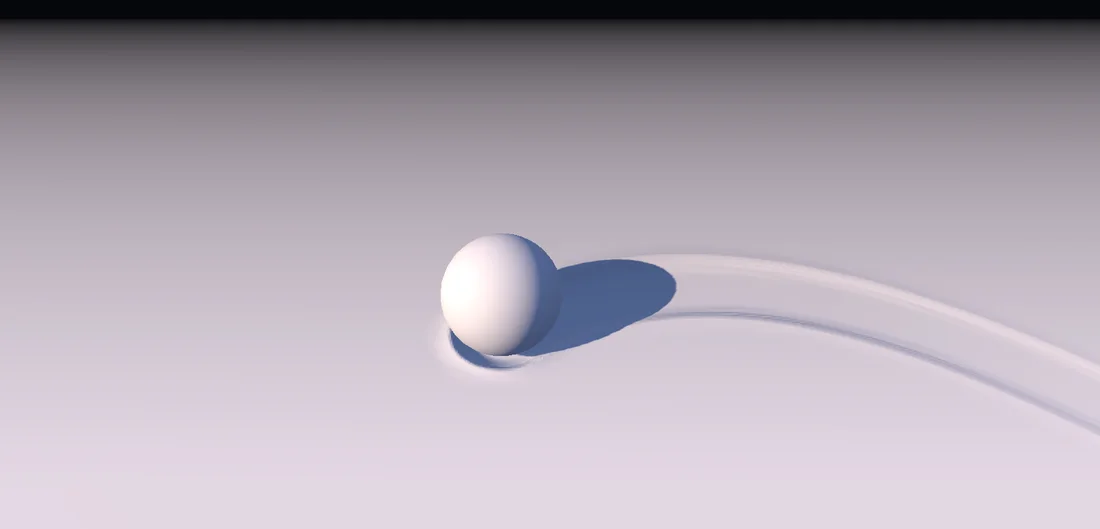
Move the ball below by clicking on the ground, or switch to Footprints mode. The thumbnail in the bottom right corner is the texture we’re about to talk about.
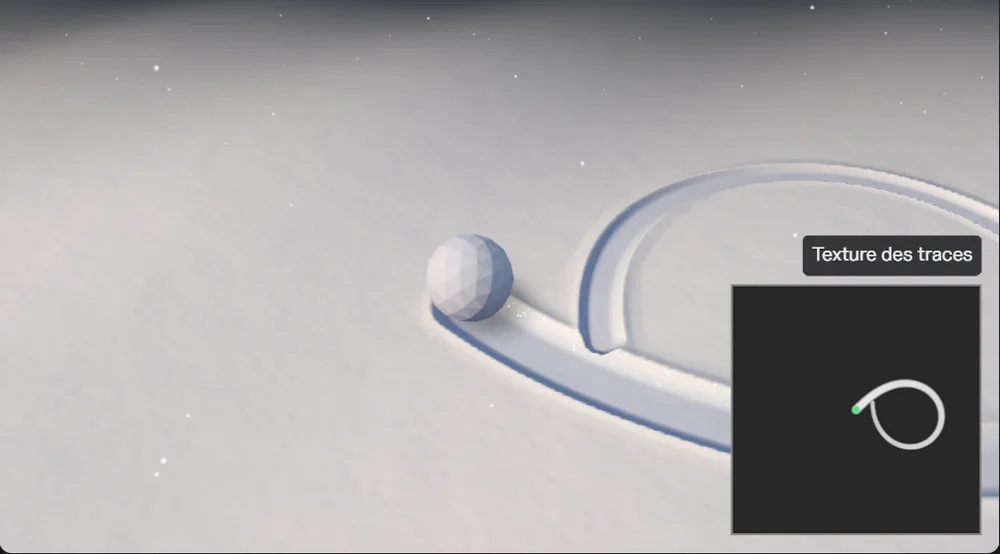
Click the ground, or use WASD or the arrows
Trail textureThe idea fits in four steps:
- StampsWhere the ball went
- Trail textureRemembers the state of the snow
- Height textureHollow and raised rim
- Snow shaderMoves the grid, rebuilds the lighting
We start from the simplest version, and each step fixes a visible flaw in the previous one. The code comes from a project made with Unity 6.3 and URP, and all of it is at the end.
Why a render texture
Three approaches come up when you want to mark the ground:
| Approach | What it does well | Its limit |
|---|---|---|
| Editing the mesh on the CPU | Easy to understand, can drive collisions | Expensive as soon as the mesh is dense |
| Decals | Quick to place, great for a stain or a flat print | No relief, and they pile up |
| Render texture read by a shader | Fixed cost, however many trails there are | Limited area, which has to follow the player |
The third one has a precious property: the cost doesn’t depend on how long the trail is. One kilometre of track or a single step, the texture stays the same size.
Step 1: writing trails into a render texture
The texture covers a square of snow around the ball: 24 m across in 1024 pixels, so about 2.3 cm per pixel. Each pixel stores a single value, from 0 for untouched snow to 1 for a full hollow.
Every frame, a small shader draws the previous frame’s texture, then adds the segment the ball travelled since last time. Using a segment rather than a point avoids gaps when the ball moves fast or the framerate drops.
float Frag(Varyings input) : SV_Target
{
    float2 previous = input.texcoord + _Shift.xy;
    float inside = all(previous >= 0.0 && previous <= 1.0) ? 1.0 : 0.0;
    float trail = SAMPLE_TEXTURE2D_X(_BlitTexture, sampler_LinearClamp, previous).r * inside;
    trail = max(0.0, trail * _Keep - _Fill);

    float2 world = _Center.xy + (input.texcoord - 0.5) * _Center.z;
    for (int i = 0; i < _StampCount; i++)
    {
        float radius = _Stamps[i].x;
        float mask = 1.0 - smoothstep(radius * 0.45, radius, DistanceToSegment(world, _Segments[i].xy, _Segments[i].zw));
        trail = max(trail, mask * _Stamps[i].y);
    }
    return trail;
}
The max matters: going over the same spot twice doesn’t dig twice as deep.
The thumbnail shows the trail texture. The ball stays in the centre, and the content scrolls.
Many tutorials write this texture with a second orthographic camera and particles. It works, but that’s one more camera to manage. Here, a simple blit is enough, and the stamps are just segments passed to the shader.
You can’t read and write the same texture in one pass. So you need two, used in turn: read A to write B, then read B to write A. As for the format, R16_SFloat is enough. With only 8 bits per channel, the slow refill from the snowfall lacks precision.
Step 2: vertex displacement in URP
The snow is a flat grid of 384 by 384 cells, about 295,000 triangles. The vertex shader reads the height and moves each vertex:
float3 Displace(float3 world)
{
    float2 uv = SnowUv(world.xz);
    world.y += SAMPLE_TEXTURE2D_LOD(_SnowHeight, sampler_SnowHeight, uv, 0).b * EdgeFade(uv);
    return world;
}
There’s one thing to remember under URP: the ShadowCaster and DepthOnly passes must apply the same displacement. Otherwise the ball’s shadow ignores the hollow and draws as if the ground were still flat.
At this point the trail exists, but it doesn’t look like a real hollow. The lighting is missing.
Step 3: rebuilding normals from the height
Three additions change everything, and you can turn them off one by one in this demo to see what each one brings.
Click the ground, or use WASD or the arrows
Trail textureThe normals. The normals of a flat grid all point up. We rebuild them for each pixel by comparing the height of its neighbours. This step gives the biggest result: you read a hollow mostly through the light catching it. A low sun helps a lot.
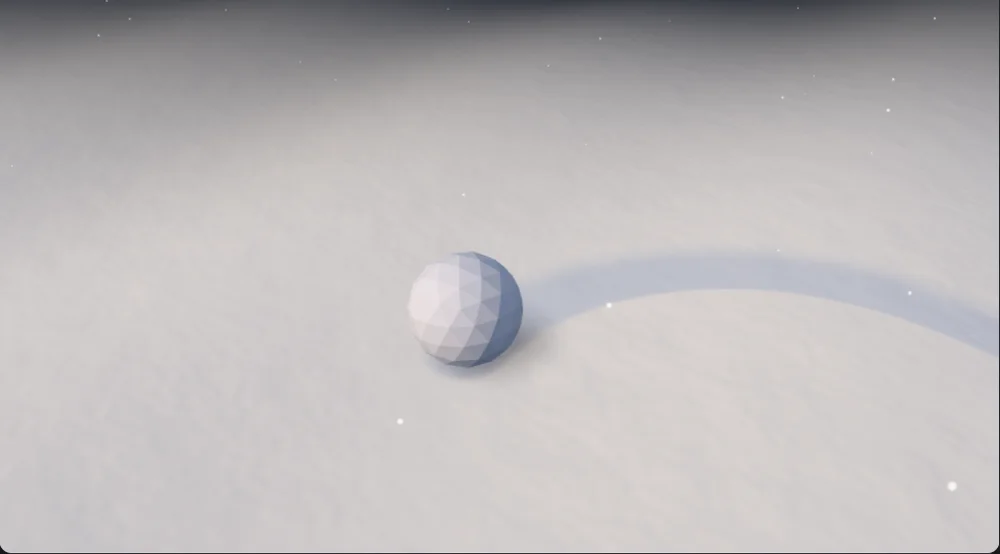
Without rebuilt normals: the geometry is dug out, but you can hardly see it.
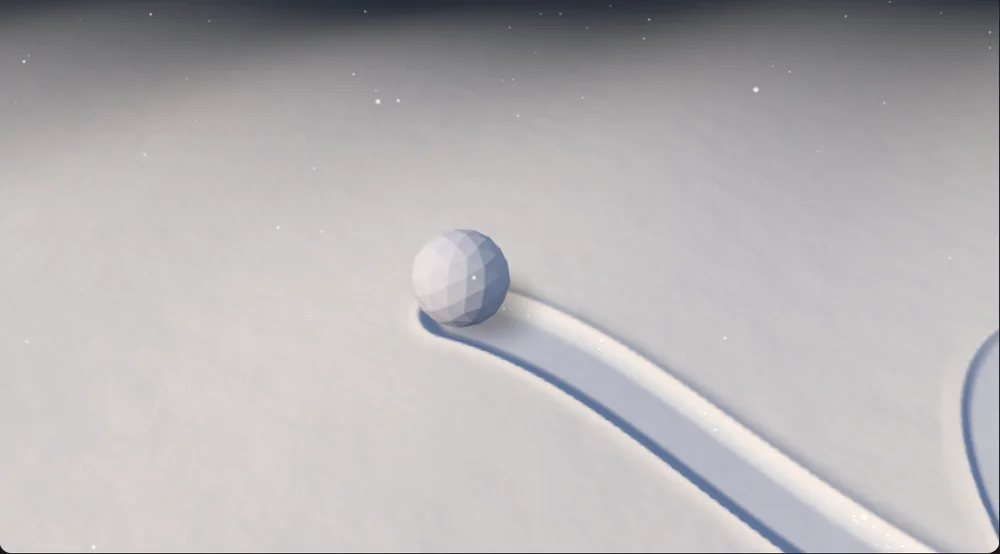
With rebuilt normals: the hollow finally shows.
The raised rim. Pushed snow has to go somewhere. A pass turns the trail into a height and raises the pixels next to a hollow:
float around = 0.0;
for (int i = 0; i < 12; i++)
{
    float angle = i * 0.5236;
    float reach = (i % 2 == 0 ? 11.0 : 6.0) * _TexelSize;
    around += SAMPLE_TEXTURE2D_X(_BlitTexture, sampler_LinearClamp, uv + float2(cos(angle), sin(angle)) * reach).r;
}
around /= 12.0;
float rim = max(0.0, around - trail) * (1.0 - trail) * _Rim;

return float4(_Depth * (rim - trail), trail, _Depth * (rim - around), 1.0);
Two heights instead of one. The last channel answers a flaw that gave me trouble. A grid cell is almost 8 cm wide and a texture pixel 2.3 cm. If the vertices read the sharp height, the steep walls of the hollow turn into saw teeth. So the vertices read a blurred height, and the normals keep the sharp one. The detail stays in the light, and the geometry stays clean.
Step 4: dense mesh, tessellation or parallax mapping?
The dense grid is the simplest choice, but not the only one. I compared three versions in a build, with the same 1024 texture:
| Surface | Geometry | CPU | GPU |
|---|---|---|---|
| Baseline, no trails | 1 quad | 0.42 ms | 0.31 ms |
| Parallax | 1 quad | 0.57 ms | 0.48 ms |
| Tessellation | 96×96 grid, ×4 near the camera | 0.64 ms | 0.56 ms |
| Dense mesh | 384×384 grid | 0.81 ms | 0.72 ms |
These numbers are the whole frame at 1600×1000 on an RX 6700 XT, the median of three 10-second runs. On a card that powerful, everything fits in under a millisecond. Look at the gaps rather than the values, and measure on your target hardware before choosing.
By eye, at this distance, you can’t tell them apart. It’s under the render that everything changes:
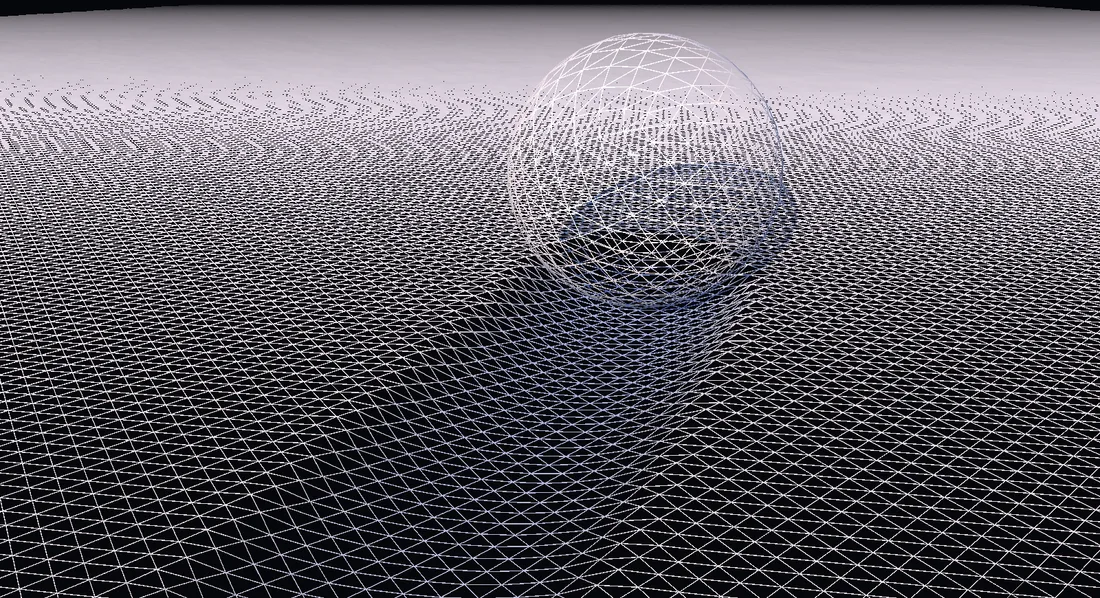
Dense mesh: the same small triangles everywhere, even where they’re useless.
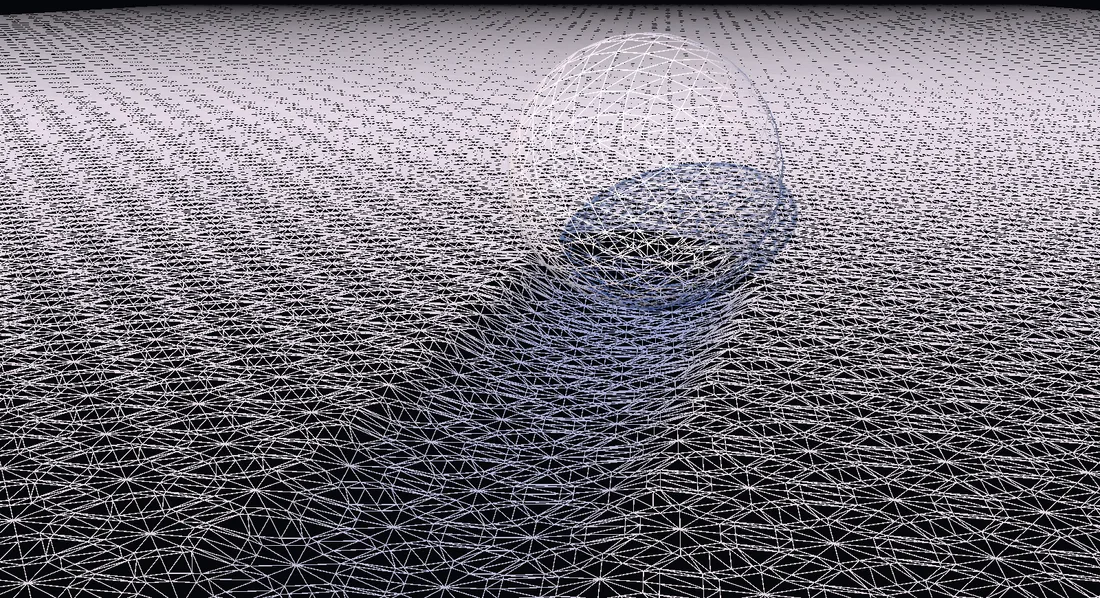
Tessellation: triangles get tighter near the camera.
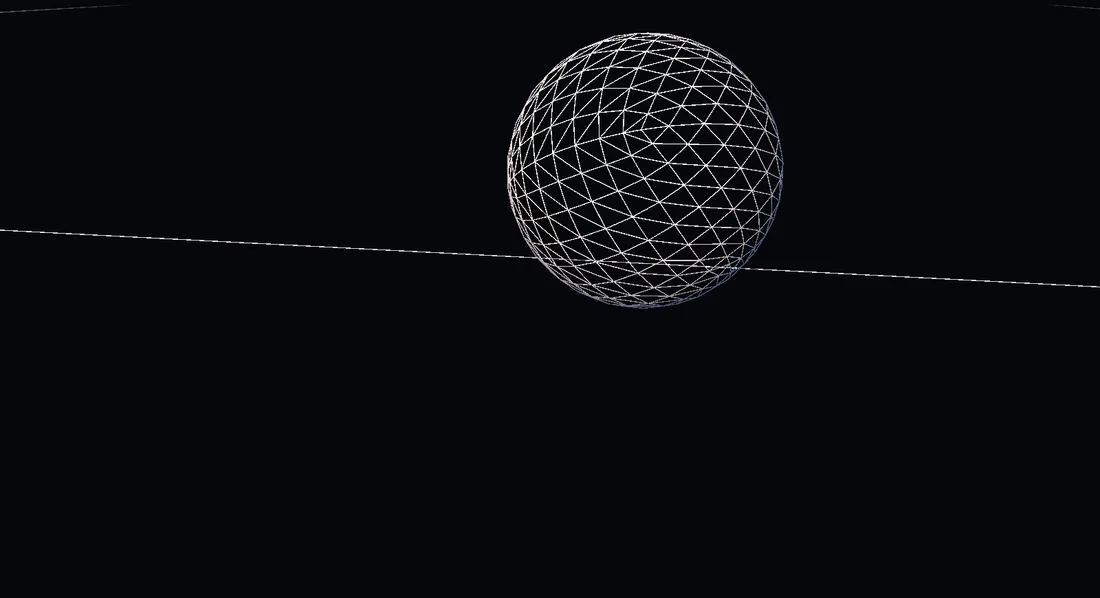
Parallax: the ground is just one big quad, all the relief is computed in the pixel.
Parallax moves nothing: a ray walks through the pixel until it hits the height. It’s the cheapest, but the geometry stays flat: a shadow crossing the trail doesn’t dip into the hollow, and the plane cuts objects sitting in the snow. It works well for shallow trails, or ones seen from far away.
Tessellation subdivides a coarse grid near the camera. To avoid cracks between neighbouring triangles, the factor has to come from the middle of each edge, so the two triangles sharing it agree. It needs hardware that supports it, so check your platforms.
The dense mesh remains the easiest to write and debug. It’s the one I kept as the default in the demo.
Step 5: letting the snow fall back
The refill fits in one line, already visible in step 1:
trail = max(0.0, trail * _Keep - _Fill);_Keep wears the hollow down proportionally and _Fill removes a small fixed amount, so the trail really ends up disappearing. Both values depend on the elapsed time, so the result stays the same at any framerate.
material.SetFloat("_Keep", Mathf.Exp(-snowfall * snowfall * 0.5f * pendingTime));
material.SetFloat("_Fill", snowfall * 0.03f * pendingTime);
Step 6: a render texture that follows the player
A 24 m texture won’t cover an open world. The solution: the square follows the player, and each frame shifts the content of the texture so the trails stay at the same place in the world. That’s the job of _Shift in the shader from step 1.
There’s a trap. If the square follows the player continuously, the shift lands between two pixels. Bilinear filtering then blends each pixel with its neighbours, every frame, and the trails melt within seconds. Try it here:
Click the ground, or use WASD or the arrows
Trail texture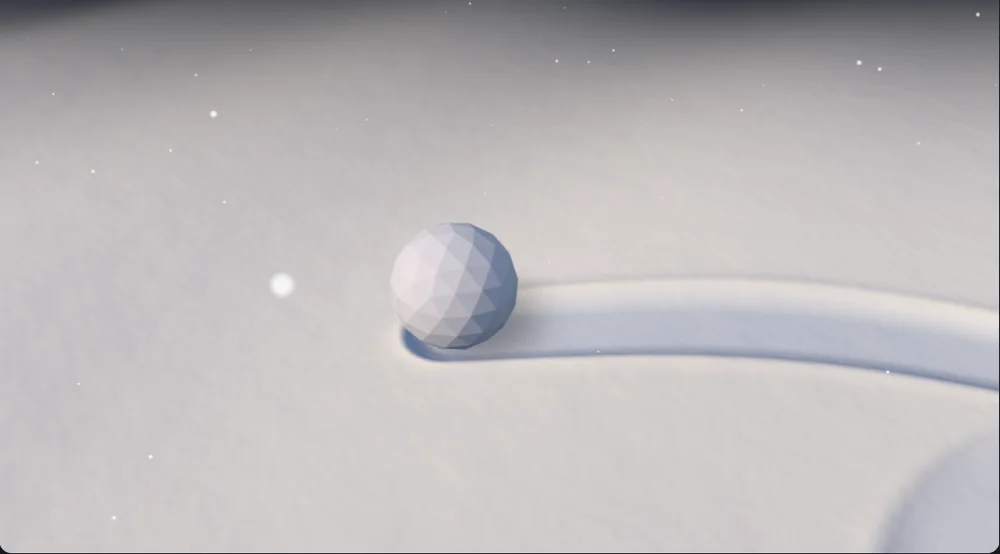
Without alignment, the trail softens as the square moves.
The fix is to move the square by whole pixels only:
Vector2 Snap(Vector2 position)
{
    if (!snapToTexels)
        return position;
    float texel = size / resolution;
    return new Vector2(Mathf.Round(position.x / texel) * texel, Mathf.Round(position.y / texel) * texel);
}
The grid follows the same principle at the scale of its cells, otherwise its vertices slide over the relief. The edges of the area fade out gently so trails don’t get cut sharply, and anything leaving the square is forgotten. If your trails have to stay forever, you’ll need to save them in chunks, which this project doesn’t do.
A custom pass in Unity 6 with Render Graph
Many tutorials predate Unity 6 and use Execute with a CommandBuffer. With the Render Graph, you declare the passes instead:
public override void RecordRenderGraph(RenderGraph renderGraph, ContextContainer frameData)
{
    var source = renderGraph.ImportTexture(Area.Source);
    var destination = renderGraph.ImportTexture(Area.Destination);
    var height = renderGraph.ImportTexture(Area.Height);
    var material = Area.SimulationMaterial;

    renderGraph.AddBlitPass(new RenderGraphUtils.BlitMaterialParameters(source, destination, material, 0), "Snow Trail");
    renderGraph.AddBlitPass(new RenderGraphUtils.BlitMaterialParameters(destination, height, material, 1), "Snow Height");
    Area.EndUpdate();
}
The ScriptableRendererFeature places this pass at RenderPassEvent.BeforeRendering, because the shadows read the height too. It only adds it for the game camera and once per frame, otherwise the Scene view or a second camera would advance the simulation several times.
The Shader Graph version
This shader is written by hand, but I also rebuilt the displacement and the normals in a real URP Lit graph. Here’s what to wire up.
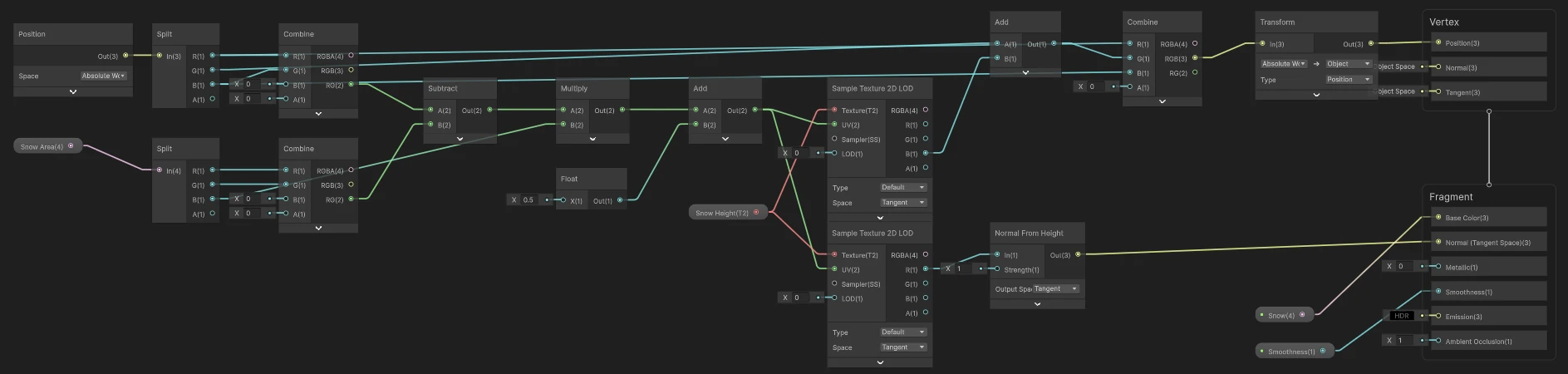
The full graph, from the world position on the left to the Vertex and Fragment blocks on the right. Click to enlarge.
Displacement, in the Vertex part:
- Create
_SnowHeight(Texture 2D) and_SnowArea(Vector 4), with these reference names. Don’t expose them, and set their Scope to Global in the node settings: the script fills them in. - Compute the UV:
(Position.xz - _SnowArea.xy) * _SnowArea.z + 0.5, with a Position node in Absolute World. - Read the height with Sample Texture 2D LOD. The regular node doesn’t work in the Vertex part.
- Add the blue channel to Y, go back to object space with Transform (Absolute World to Object, type Position), then plug into Position.
Normals, in the Fragment part: read the red channel with the same UV, run it through Normal From Height, then plug into Normal (Tangent Space).
The same effect with Shader Graph, without the details of the hand-written shader: no snow grain, no packed snow tint.
Three traps got me, and none of them gives an error:
- The ground stays plain and unlit: your grid has no normals or tangents. My hand-written shader did without them, Shader Graph doesn’t. You have to add them to the mesh.
- The shadow deforms but the trail doesn’t show: the Strength of Normal From Height defaults to 0.01. Here, with a height in metres, it had to go up to 1.
- Nothing gets dug out: check the
+ 0.5in the UV. Without it, the graph reads the texture in the wrong place, and the trail disappears silently.
The good news: Shader Graph applies the displacement to the shadow and depth passes without writing anything more. This simplified version ran at 0.54 ms of GPU against 0.72 ms for the hand-written shader, but it does less, so the two numbers aren’t directly comparable.
Performance
For memory, at 1024 pixels, the two trail textures in R16_SFloat and the height texture in R16G16B16A16_SFloat come to about 13 MB, not counting any driver overhead.
With the dense mesh, median of three runs:
| Setting | GPU |
|---|---|
| 512 texture, 384 grid | 0.69 ms |
| 1024 texture, 384 grid | 0.72 ms |
| 2048 texture, 384 grid | 0.90 ms |
| 1024 texture, 192 grid | 0.57 ms |
| 1024 texture, 96 grid | 0.48 ms |
So the grid is the first lever, and the texture only gets really expensive at 2048. One idea the project doesn’t apply: only update the texture when something moved or when snow is falling.
How big games do it
The principle stays close, with more resources. In an interview about the snow in God of War Ragnarök, Paolo Surricchio of Santa Monica Studio explains that the team replaced its screen-space parallax with real displacement using hardware tessellation. The same limits as in step 4, at another scale. The displacement is carved every frame on the GPU, and capsules attached to physics bodies push the snow down.
For Rise of the Tomb Raider, Michels and Sikachev published “Deferred Snow Deformation” in GPU Pro 7, if you want to go further.
Deforming sand, mud or terrain
The technique isn’t specific to snow. The same code works for sand, mud or flattened grass, mostly by changing three things:
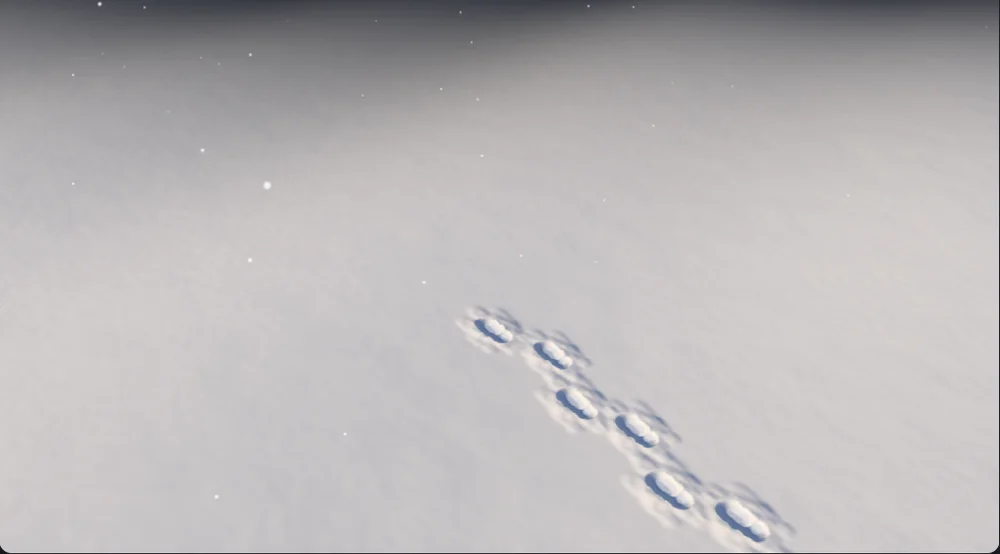
The demo’s Footprints mode: only the stamp changes.
- The refill: none for mud that keeps its tracks, slow for sand swept by the wind.
- The rim: sharp in mud, very light in dry sand.
- The stamp shape: a continuous line for a ball, a foot shape placed at each step for footprints.
Frequently asked questions
What texture resolution should I pick? Divide the size of the area by the number of pixels. Here, 24 m in 1024 pixels gives 2.3 cm per pixel, about a dozen pixels for a 30 cm footprint. If your trails are finer, shrink the area first: 12 m in 1024 pixels gives 1.2 cm per pixel at no extra cost.
What should I lower first on a small configuration? The grid. Going from 384 to 192 divides the triangle count by four, and saved 0.15 ms of GPU on my card, against 0.03 ms for going from a 1024 to a 512 texture. If you’re aiming for tessellation, check SystemInfo.supportsTessellationShaders first.
Does it work on a Unity Terrain? Yes, but there’s a trap. I tested a 128 m Terrain with a 1025 heightmap and this material, with Draw Instanced turned off. If it’s perfectly flat, Unity merges everything into very large triangles: there’s almost nothing left to displace, and only the normals give the illusion of a hollow.
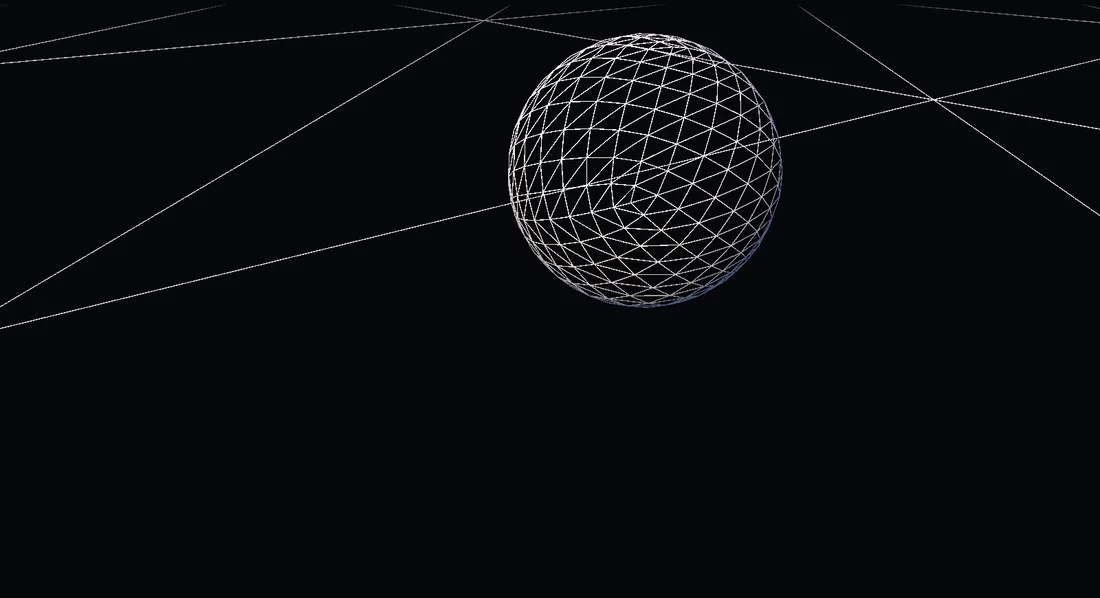
Perfectly flat terrain: a few huge triangles.
A tiny relief is enough to keep full resolution. With 8 mm of checkerboard variation, you get back a 12.5 cm grid, which is the heightmap’s step. GPU time then goes from 0.43 to 0.56 ms.
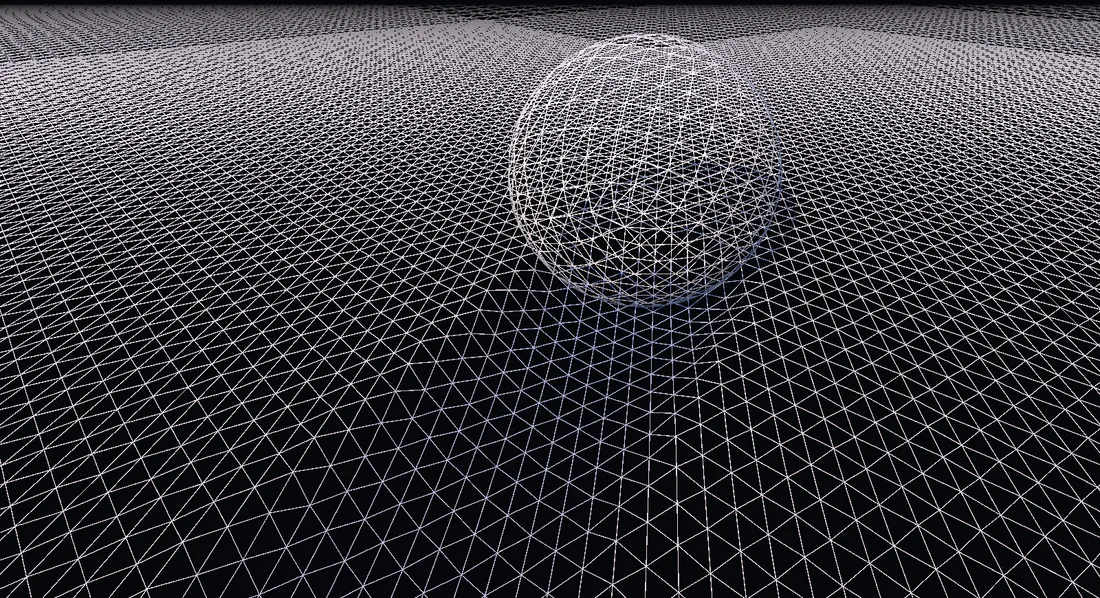
With 8 mm of tiny relief: the grid comes back.
This shader ignores the terrain’s relief in its normals: on real hills you’ll have to combine them, which I haven’t tested.
Why do my trails disappear on LODs? Often because the relief depends on the mesh’s UVs. Here, everything goes through the world position: any mesh with this material reads the same trail. I checked it with grids of 96, 192 and 384. Only the precision changes. Transitions between levels aren’t tested.
How do I make an object sink into the snow? The simplest way is a fixed offset. The demo’s ball sits at 82% of its radius above the ground:
position.y = radius * 0.82f;To follow the exact height, you need to read the texture back on the CPU with AsyncGPUReadback, requesting only the area under the object. The result arrives a few frames later, which is fine for a walking character.
The full code
All you need is these eight files in a Unity 6 URP project, with the Input System package for the keyboard. Then:
- In your URP Renderer, click Add Renderer Feature and add Snow Trail Feature.
- Create a sphere and add SnowBall to it.
- Create an empty object with SnowTrailArea. Set the sphere as
TargetandHidden/SnowTrails/SimulationasSimulation Shader, then assign it to the sphere’sAreafield. - Create an empty object with SnowSurface, set the sphere as
Target, and give its Mesh Renderer a material usingSnowTrails/Snow. - Run the game. To see the relief well, use a low sun with shadows on.
SnowTrailArea.cs
using System.Collections.Generic;
using UnityEngine;
using UnityEngine.Experimental.Rendering;
using UnityEngine.Rendering;

namespace SnowTrails
{
    // Trail textures + the square of snow they cover. The square follows the target so the
    // world can be as big as you want. SnowTrailFeature does the actual drawing.
    public sealed class SnowTrailArea : MonoBehaviour
    {
        const int MaxStamps = 8;

        public static SnowTrailArea Active { get; private set; }

        [SerializeField] Transform target;
        [SerializeField] Shader simulationShader;
        [SerializeField] float size = 24f;
        [SerializeField] int resolution = 1024;
        [SerializeField, Range(0.05f, 0.5f)] float depth = 0.22f;
        [SerializeField, Range(0f, 2f)] float rim = 1.3f;
        [SerializeField, Range(0f, 1f)] float snowfall = 0.2f;
        [Tooltip("Turn it off to see the trails smear")]
        [SerializeField] bool snapToTexels = true;

        readonly List<(Vector3 from, Vector3 to, float radius, float strength)> stamps = new();
        readonly Vector4[] segmentData = new Vector4[MaxStamps];
        readonly Vector4[] stampData = new Vector4[MaxStamps];

        RenderTexture trailA, trailB, height;
        RTHandle trailHandleA, trailHandleB, heightHandle;
        Material material;
        Vector2 center;
        float pendingTime;
        bool readsFromA = true;

        public int Resolution { get => resolution; set => resolution = value; }
        public bool Frozen { get; set; }
        public Material SimulationMaterial => material;
        public RTHandle Source => readsFromA ? trailHandleA : trailHandleB;
        public RTHandle Destination => readsFromA ? trailHandleB : trailHandleA;
        public RTHandle Height => heightHandle;

        public void AddStamp(Vector3 from, Vector3 to, float radius, float strength)
        {
            if (stamps.Count < MaxStamps)
                stamps.Add((from, to, radius, strength));
        }

        public bool BeginUpdate()
        {
            if (pendingTime <= 0f || Frozen)
                return false;

            MoveArea();

            material.SetFloat("_Keep", Mathf.Exp(-snowfall * snowfall * 0.5f * pendingTime));
            material.SetFloat("_Fill", snowfall * 0.03f * pendingTime);
            material.SetFloat("_Depth", depth);
            material.SetFloat("_Rim", rim);
            material.SetFloat("_TexelSize", 1f / resolution);

            for (int i = 0; i < stamps.Count; i++)
            {
                var (from, to, radius, strength) = stamps[i];
                segmentData[i] = new Vector4(from.x, from.z, to.x, to.z);
                stampData[i] = new Vector4(radius, strength);
            }
            material.SetInt("_StampCount", stamps.Count);
            material.SetVectorArray("_Segments", segmentData);
            material.SetVectorArray("_Stamps", stampData);

            stamps.Clear();
            pendingTime = 0f;
            return true;
        }

        // swap for next frame
        public void EndUpdate() => readsFromA = !readsFromA;

        void OnEnable()
        {
            material = new Material(simulationShader);
            trailA = CreateTexture(GraphicsFormat.R16_SFloat, "Snow Trail A");
            trailB = CreateTexture(GraphicsFormat.R16_SFloat, "Snow Trail B");
            height = CreateTexture(GraphicsFormat.R16G16B16A16_SFloat, "Snow Height");
            trailHandleA = RTHandles.Alloc(trailA);
            trailHandleB = RTHandles.Alloc(trailB);
            heightHandle = RTHandles.Alloc(height);

            center = Snap(new Vector2(target.position.x, target.position.z));
            Shader.SetGlobalTexture("_SnowHeight", height);
            UpdateGlobals();
            Active = this;
        }

        void OnDisable()
        {
            if (Active == this)
                Active = null;
            trailHandleA.Release();
            trailHandleB.Release();
            heightHandle.Release();
            trailA.Release();
            trailB.Release();
            height.Release();
            Destroy(material);
        }

        void Update() => pendingTime += Time.deltaTime;

        void MoveArea()
        {
            Vector2 next = Snap(new Vector2(target.position.x, target.position.z));
            material.SetVector("_Shift", (next - center) / size);
            center = next;
            material.SetVector("_Center", new Vector4(center.x, center.y, size));
            UpdateGlobals();
        }

        Vector2 Snap(Vector2 position)
        {
            if (!snapToTexels)
                return position;
            float texel = size / resolution;
            return new Vector2(Mathf.Round(position.x / texel) * texel, Mathf.Round(position.y / texel) * texel);
        }

        void UpdateGlobals()
        {
            Shader.SetGlobalVector("_SnowArea", new Vector4(center.x, center.y, 1f / size, size / resolution * 1.5f));
        }

        RenderTexture CreateTexture(GraphicsFormat format, string textureName)
        {
            var texture = new RenderTexture(resolution, resolution, GraphicsFormat.None, GraphicsFormat.None)
            {
                name = textureName,
                graphicsFormat = format,
                filterMode = FilterMode.Bilinear,
                wrapMode = TextureWrapMode.Clamp,
            };
            texture.Create();

            var previous = RenderTexture.active;
            RenderTexture.active = texture;
            GL.Clear(false, true, Color.clear);
            RenderTexture.active = previous;
            return texture;
        }
    }
}
SnowTrailFeature.cs
using UnityEngine;
using UnityEngine.Rendering;
using UnityEngine.Rendering.RenderGraphModule;
using UnityEngine.Rendering.RenderGraphModule.Util;
using UnityEngine.Rendering.Universal;

namespace SnowTrails
{
    // Has to run before the shadows, they read the height too.
    public sealed class SnowTrailFeature : ScriptableRendererFeature
    {
        SnowTrailPass pass;

        public override void Create()
        {
            pass = new SnowTrailPass { renderPassEvent = RenderPassEvent.BeforeRendering };
        }

        public override void AddRenderPasses(ScriptableRenderer renderer, ref RenderingData renderingData)
        {
            var area = SnowTrailArea.Active;
            if (area == null || renderingData.cameraData.cameraType != CameraType.Game)
                return;

            if (area.BeginUpdate())
            {
                pass.Area = area;
                renderer.EnqueuePass(pass);
            }
        }

        sealed class SnowTrailPass : ScriptableRenderPass
        {
            public SnowTrailArea Area;

            public override void RecordRenderGraph(RenderGraph renderGraph, ContextContainer frameData)
            {
                var source = renderGraph.ImportTexture(Area.Source);
                var destination = renderGraph.ImportTexture(Area.Destination);
                var height = renderGraph.ImportTexture(Area.Height);
                var material = Area.SimulationMaterial;

                renderGraph.AddBlitPass(new RenderGraphUtils.BlitMaterialParameters(source, destination, material, 0), "Snow Trail");
                renderGraph.AddBlitPass(new RenderGraphUtils.BlitMaterialParameters(destination, height, material, 1), "Snow Height");
                Area.EndUpdate();
            }
        }
    }
}
SnowSurface.cs
using UnityEngine;
using UnityEngine.Rendering;

namespace SnowTrails
{
    [RequireComponent(typeof(MeshFilter), typeof(MeshRenderer))]
    public sealed class SnowSurface : MonoBehaviour
    {
        [SerializeField] Transform target;
        [SerializeField] float size = 30f;
        [SerializeField] int segments = 384;

        Mesh mesh;

        public int Segments { get => segments; set => segments = value; }

        void OnEnable()
        {
            mesh = CreateGrid();
            GetComponent<MeshFilter>().sharedMesh = mesh;
        }

        void OnDisable() => Destroy(mesh);

        // whole cells only, otherwise the vertices swim
        void LateUpdate()
        {
            float cell = Mathf.Min(size / segments, 1f);
            var position = target.position;
            transform.position = new Vector3(Mathf.Round(position.x / cell) * cell, 0f, Mathf.Round(position.z / cell) * cell);
        }

        Mesh CreateGrid()
        {
            int row = segments + 1;
            var vertices = new Vector3[row * row];
            for (int z = 0; z < row; z++)
            for (int x = 0; x < row; x++)
                vertices[z * row + x] = new Vector3((x / (float)segments - 0.5f) * size, 0f, (z / (float)segments - 0.5f) * size);

            // the hand-written shader doesn't need these, Shader Graph does
            var normals = new Vector3[vertices.Length];
            var tangents = new Vector4[vertices.Length];
            for (int i = 0; i < vertices.Length; i++)
            {
                normals[i] = Vector3.up;
                tangents[i] = new Vector4(1f, 0f, 0f, -1f);
            }

            var triangles = new int[segments * segments * 6];
            for (int z = 0, i = 0; z < segments; z++)
            for (int x = 0; x < segments; x++, i += 6)
            {
                int corner = z * row + x;
                triangles[i] = corner;
                triangles[i + 1] = corner + row;
                triangles[i + 2] = corner + 1;
                triangles[i + 3] = corner + 1;
                triangles[i + 4] = corner + row;
                triangles[i + 5] = corner + row + 1;
            }

            var grid = new Mesh { name = "Snow Grid", indexFormat = IndexFormat.UInt32, vertices = vertices, normals = normals, tangents = tangents, triangles = triangles };
            // vertices move in the shader, unity can't know that
            grid.bounds = new Bounds(Vector3.zero, new Vector3(size, 2f, size));
            return grid;
        }
    }
}
SnowBall.cs
using UnityEngine;
using UnityEngine.InputSystem;

namespace SnowTrails
{
    // Wanders around on its own until you press WASD.
    public sealed class SnowBall : MonoBehaviour
    {
        [SerializeField] SnowTrailArea area;
        [SerializeField] float speed = 3f;
        [SerializeField] float startRadius = 0.28f;
        [SerializeField] float maxRadius = 0.75f;
        [SerializeField] float growthPerMetre = 0.012f;

        float radius;
        float heading;
        float wanderTime;
        bool autopilot = true;
        Vector3 previous;

        public Vector3? ForcedDirection { get; set; }

        void Start()
        {
            radius = startRadius;
            previous = transform.position;
        }

        void Update()
        {
            var direction = ReadDirection();
            if (direction == Vector3.zero)
                return;

            float distance = speed * Time.deltaTime;
            radius = Mathf.Min(maxRadius, radius + distance * growthPerMetre);

            var position = transform.position + direction * distance;
            position.y = radius * 0.82f;
            transform.position = position;
            transform.localScale = Vector3.one * radius * 2f;
            transform.Rotate(Vector3.Cross(Vector3.up, direction), distance / radius * Mathf.Rad2Deg, Space.World);

            area.AddStamp(previous, position, radius * 0.95f, 0.55f + radius * 0.45f);
            previous = position;
        }

        Vector3 ReadDirection()
        {
            if (ForcedDirection.HasValue)
                return ForcedDirection.Value;

            var keyboard = Keyboard.current;
            if (keyboard != null)
            {
                float x = (keyboard.dKey.isPressed ? 1f : 0f) - (keyboard.aKey.isPressed ? 1f : 0f);
                float z = (keyboard.wKey.isPressed ? 1f : 0f) - (keyboard.sKey.isPressed ? 1f : 0f);
                if (x != 0f || z != 0f)
                {
                    autopilot = false;
                    return new Vector3(x, 0f, z).normalized;
                }
            }
            if (!autopilot)
                return Vector3.zero;

            wanderTime += Time.deltaTime;
            heading += (Mathf.Sin(wanderTime * 0.41f) * 0.75f + Mathf.Sin(wanderTime * 0.17f + 2f) * 0.55f) * Time.deltaTime;
            return new Vector3(Mathf.Sin(heading), 0f, Mathf.Cos(heading));
        }
    }
}
SnowTrailSimulation.shader
// Pass 0: last frame's trail, a bit filled by the snowfall, plus the new stamps.
// Pass 1: trail -> height for the snow shader.
Shader "Hidden/SnowTrails/Simulation"
{
    SubShader
    {
        Tags { "RenderPipeline" = "UniversalPipeline" }
        ZTest Always
        ZWrite Off
        Cull Off

        HLSLINCLUDE
        #include "Packages/com.unity.render-pipelines.universal/ShaderLibrary/Core.hlsl"
        #include "Packages/com.unity.render-pipelines.core/Runtime/Utilities/Blit.hlsl"
        #define MAX_STAMPS 8
        ENDHLSL

        Pass
        {
            Name "Trail"

            HLSLPROGRAM
            #pragma vertex Vert
            #pragma fragment Frag

            float4 _Center; // xy: area centre in world space, z: area size
            float4 _Shift; // xy: how far the area moved since last frame, in uv
            float _Keep;
            float _Fill;
            int _StampCount;
            float4 _Segments[MAX_STAMPS]; // xy to zw, in world space
            float4 _Stamps[MAX_STAMPS]; // x: radius, y: strength

            float DistanceToSegment(float2 p, float2 a, float2 b)
            {
                float2 ab = b - a;
                float len = dot(ab, ab);
                float t = len > 0.0 ? saturate(dot(p - a, ab) / len) : 0.0;
                return length(p - a - ab * t);
            }

            float Frag(Varyings input) : SV_Target
            {
                // the area moved, so look where this texel was last frame
                float2 previous = input.texcoord + _Shift.xy;
                float inside = all(previous >= 0.0 && previous <= 1.0) ? 1.0 : 0.0;
                float trail = SAMPLE_TEXTURE2D_X(_BlitTexture, sampler_LinearClamp, previous).r * inside;
                trail = max(0.0, trail * _Keep - _Fill);

                float2 world = _Center.xy + (input.texcoord - 0.5) * _Center.z;
                for (int i = 0; i < _StampCount; i++)
                {
                    float radius = _Stamps[i].x;
                    float mask = 1.0 - smoothstep(radius * 0.45, radius, DistanceToSegment(world, _Segments[i].xy, _Segments[i].zw));
                    trail = max(trail, mask * _Stamps[i].y);
                }
                return trail;
            }
            ENDHLSL
        }

        Pass
        {
            Name "Height"

            HLSLPROGRAM
            #pragma vertex Vert
            #pragma fragment Frag

            float _Depth;
            float _Rim;
            float _TexelSize;

            float4 Frag(Varyings input) : SV_Target
            {
                float2 uv = input.texcoord;
                float trail = SAMPLE_TEXTURE2D_X(_BlitTexture, sampler_LinearClamp, uv).r;

                // pushed snow piles up next to the hollow
                float around = 0.0;
                for (int i = 0; i < 12; i++)
                {
                    float angle = i * 0.5236;
                    float reach = (i % 2 == 0 ? 11.0 : 6.0) * _TexelSize;
                    around += SAMPLE_TEXTURE2D_X(_BlitTexture, sampler_LinearClamp, uv + float2(cos(angle), sin(angle)) * reach).r;
                }
                around /= 12.0;
                float rim = max(0.0, around - trail) * (1.0 - trail) * _Rim;

                // r: sharp, for normals. b: blurred, for vertices. The grid is coarser than the
                // texture, with the sharp one the walls look like saw teeth.
                return float4(_Depth * (rim - trail), trail, _Depth * (rim - around), 1.0);
            }
            ENDHLSL
        }
    }
}
SnowCommon.hlsl
#ifndef SNOW_COMMON_INCLUDED
#define SNOW_COMMON_INCLUDED

#include "Packages/com.unity.render-pipelines.universal/ShaderLibrary/Core.hlsl"

TEXTURE2D(_SnowHeight);
SAMPLER(sampler_SnowHeight);
float4 _SnowArea; // xy: centre, z: 1 / size, w: distance between two normal samples

CBUFFER_START(UnityPerMaterial)
    half4 _BaseColor;
    half4 _PackedColor;
    half _Smoothness;
CBUFFER_END

float2 SnowUv(float2 world)
{
    return (world - _SnowArea.xy) * _SnowArea.z + 0.5;
}

// so trails don't get cut at the edge of the area
float EdgeFade(float2 uv)
{
    float2 fade = smoothstep(0.0, 0.04, uv) * smoothstep(1.0, 0.96, uv);
    return fade.x * fade.y;
}

float3 Displace(float3 world)
{
    float2 uv = SnowUv(world.xz);
    world.y += SAMPLE_TEXTURE2D_LOD(_SnowHeight, sampler_SnowHeight, uv, 0).b * EdgeFade(uv);
    return world;
}

#endif
SnowLighting.hlsl
#ifndef SNOW_LIGHTING_INCLUDED
#define SNOW_LIGHTING_INCLUDED

#include "SnowCommon.hlsl"
#include "Packages/com.unity.render-pipelines.universal/ShaderLibrary/Lighting.hlsl"

float Hash(float2 p)
{
    return frac(sin(dot(p, float2(127.1, 311.7))) * 43758.5453);
}

float Noise(float2 p)
{
    float2 i = floor(p);
    float2 f = frac(p);
    f = f * f * (3.0 - 2.0 * f);
    return lerp(lerp(Hash(i), Hash(i + float2(1, 0)), f.x),
                lerp(Hash(i + float2(0, 1)), Hash(i + float2(1, 1)), f.x), f.y);
}

float Surface(float2 world)
{
    float2 uv = SnowUv(world);
    float trail = SAMPLE_TEXTURE2D_LOD(_SnowHeight, sampler_SnowHeight, uv, 0).r * EdgeFade(uv);
    return trail + 0.012 * Noise(world * 2.3) + 0.004 * Noise(world * 9.0);
}

half4 ShadeSnow(float3 positionWS, float4 positionCS, float fog)
{
    float2 p = positionWS.xz;
    float e = _SnowArea.w;
    float3 normal = normalize(float3(
        Surface(p - float2(e, 0)) - Surface(p + float2(e, 0)),
        2.0 * e,
        Surface(p - float2(0, e)) - Surface(p + float2(0, e))));

    float2 uv = SnowUv(p);
    float packed = SAMPLE_TEXTURE2D_LOD(_SnowHeight, sampler_SnowHeight, uv, 0).g * EdgeFade(uv);

    InputData inputData = (InputData)0;
    inputData.positionWS = positionWS;
    inputData.positionCS = positionCS;
    inputData.normalWS = normal;
    inputData.viewDirectionWS = GetWorldSpaceNormalizeViewDir(positionWS);
    inputData.shadowCoord = TransformWorldToShadowCoord(positionWS);
    inputData.bakedGI = SampleSH(normal);
    inputData.normalizedScreenSpaceUV = GetNormalizedScreenSpaceUV(positionCS);
    inputData.shadowMask = half4(1, 1, 1, 1);

    SurfaceData surface = (SurfaceData)0;
    surface.albedo = lerp(_BaseColor.rgb, _BaseColor.rgb * _PackedColor.rgb, packed);
    surface.smoothness = _Smoothness;
    surface.occlusion = 1.0;
    surface.alpha = 1.0;
    surface.normalTS = half3(0, 0, 1);

    half4 color = UniversalFragmentPBR(inputData, surface);
    color.rgb = MixFog(color.rgb, fog);
    return color;
}

#endif
Snow.shader
// Grid moved by the height texture, normals rebuilt per pixel.
// Shadow and depth passes have to move the vertices too or shadows ignore the trail.
Shader "SnowTrails/Snow"
{
    Properties
    {
        _BaseColor ("Snow", Color) = (0.93, 0.95, 1.0, 1.0)
        _PackedColor ("Packed snow", Color) = (0.66, 0.75, 0.95, 1.0)
        _Smoothness ("Smoothness", Range(0, 1)) = 0.25
    }

    SubShader
    {
        Tags { "RenderType" = "Opaque" "RenderPipeline" = "UniversalPipeline" "Queue" = "Geometry" }

        Pass
        {
            Name "ForwardLit"
            Tags { "LightMode" = "UniversalForward" }

            HLSLPROGRAM
            #pragma vertex Vertex
            #pragma fragment Fragment
            #pragma multi_compile _ _MAIN_LIGHT_SHADOWS _MAIN_LIGHT_SHADOWS_CASCADE _MAIN_LIGHT_SHADOWS_SCREEN
            #pragma multi_compile_fragment _ _SHADOWS_SOFT
            #pragma multi_compile_fog

            #include "SnowLighting.hlsl"

            struct Interpolators
            {
                float4 positionCS : SV_POSITION;
                float3 positionWS : TEXCOORD0;
            };

            Interpolators Vertex(float3 positionOS : POSITION)
            {
                Interpolators output;
                output.positionWS = Displace(TransformObjectToWorld(positionOS));
                output.positionCS = TransformWorldToHClip(output.positionWS);
                return output;
            }

            half4 Fragment(Interpolators input) : SV_Target
            {
                float fog = ComputeFogFactor(TransformWorldToHClip(input.positionWS).z);
                return ShadeSnow(input.positionWS, input.positionCS, fog);
            }
            ENDHLSL
        }

        Pass
        {
            Name "ShadowCaster"
            Tags { "LightMode" = "ShadowCaster" }
            ZWrite On
            ColorMask 0

            HLSLPROGRAM
            #pragma vertex Vertex
            #pragma fragment Fragment

            #include "SnowCommon.hlsl"
            #include "Packages/com.unity.render-pipelines.universal/ShaderLibrary/Shadows.hlsl"

            float3 _LightDirection;

            float4 Vertex(float3 positionOS : POSITION) : SV_POSITION
            {
                float3 world = ApplyShadowBias(Displace(TransformObjectToWorld(positionOS)), float3(0, 1, 0), _LightDirection);
                float4 clip = TransformWorldToHClip(world);
                #if UNITY_REVERSED_Z
                clip.z = min(clip.z, UNITY_NEAR_CLIP_VALUE);
                #else
                clip.z = max(clip.z, UNITY_NEAR_CLIP_VALUE);
                #endif
                return clip;
            }

            half4 Fragment() : SV_Target
            {
                return 0;
            }
            ENDHLSL
        }

        Pass
        {
            Name "DepthOnly"
            Tags { "LightMode" = "DepthOnly" }
            ZWrite On
            ColorMask R

            HLSLPROGRAM
            #pragma vertex Vertex
            #pragma fragment Fragment

            #include "SnowCommon.hlsl"

            float4 Vertex(float3 positionOS : POSITION) : SV_POSITION
            {
                return TransformWorldToHClip(Displace(TransformObjectToWorld(positionOS)));
            }

            half4 Fragment() : SV_Target
            {
                return 0;
            }
            ENDHLSL
        }
    }
}
In short
A render texture that follows the player, a pass to turn it into a height, a shader that uses it to move the grid and rebuild the normals. The real details are elsewhere: the shadow passes you mustn’t forget, two heights to avoid saw teeth, and pixel alignment so the trails don’t melt.
If real-time work interests you, I also wrote about the rollback netcode of Runner Party, with the same hands-on demos.